
If you’ve been writing JavaScript for a while, chances are you’ve already used closures dozens — maybe hundreds — of times.
The strange part?
Many developers still can’t confidently explain what a closure actually is.
And honestly, that’s understandable.
Closures are one of those JavaScript concepts that seem simple in theory but become confusing the moment asynchronous code, loops, React hooks, or event listeners enter the picture.
You’ve probably seen bugs like:
A loop logging the wrong value
React state behaving unexpectedly
Event listeners remembering stale data
Timers accessing outdated variables
Most of those issues come down to one thing:
Not fully understanding closures.
In this article, we’ll break closures down in the most practical way possible — without academic jargon or confusing textbook definitions.
By the end, you’ll understand:
What closures actually are
Why JavaScript relies on them everywhere
Common closure-related bugs
How React hooks heavily depend on closures
How to finally build the correct mental model
Let’s start with the foundation.
What Is a JavaScript Closure?
The official definition usually sounds something like this:
“A closure is a function bundled together with references to its surrounding lexical environment.”
That definition is technically correct.
It’s also why developers get confused.
Here’s the simpler explanation:
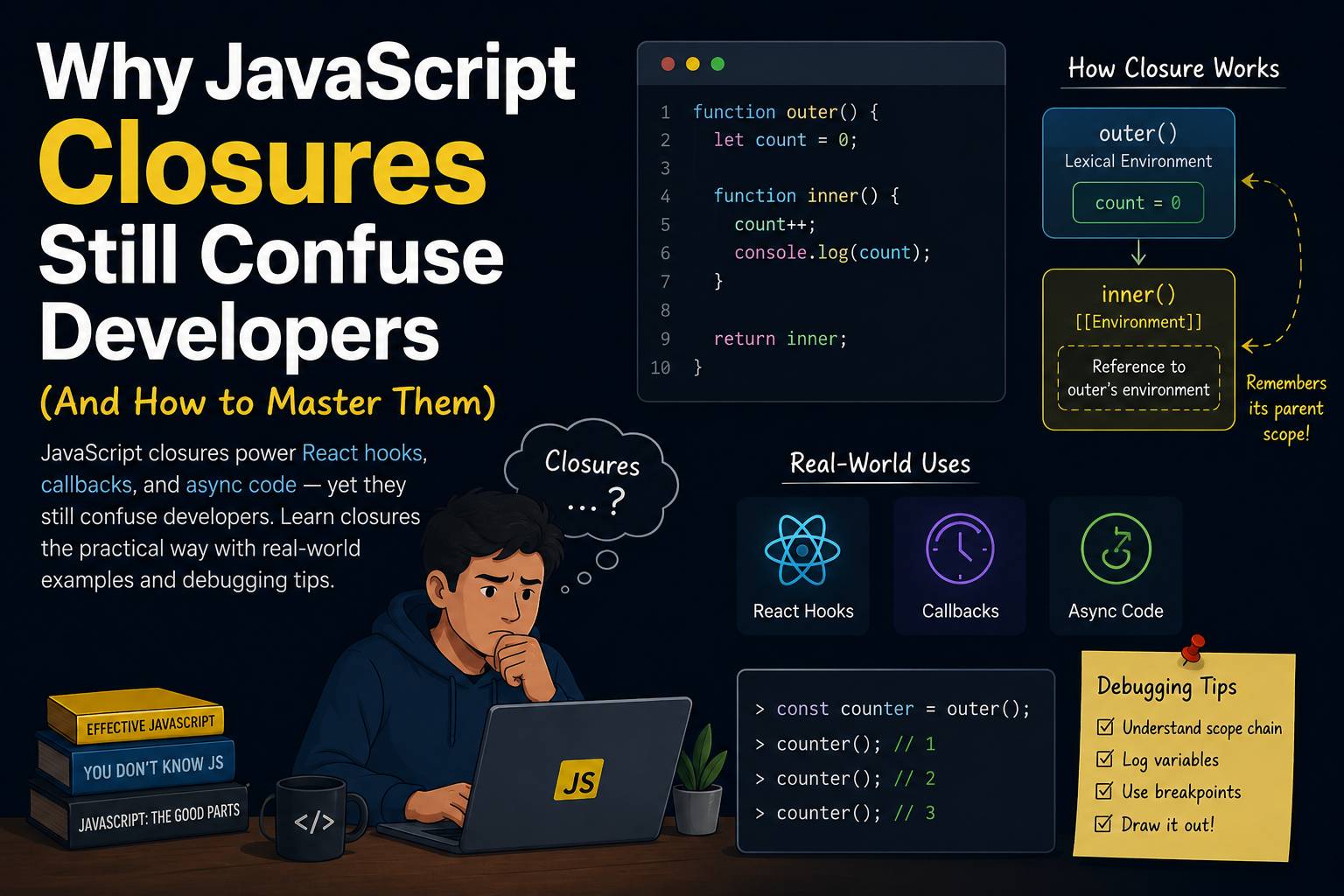
A closure allows a function to remember variables from the place where it was created — even after that outer function has finished running.
Let’s see it in action.
function createCounter() {
  let count = 0;

  return function () {
    count++;
    console.log(count);
  };
}

const counter = createCounter();

counter(); // 1
counter(); // 2
counter(); // 3
At first glance, this looks weird.
createCounter() has already finished executing.
So why does count still exist?
Because the returned function forms a closure around the count variable.
It “remembers” its environment.
The Mental Model That Makes Closures Click
Instead of thinking:
❌ “The variable should disappear after the function runs.”
Think:
✅ “The inner function keeps a live reference to the variables it uses.”
That distinction changes everything.
Closures do not store copies of variables.
They store references to the original variables.
This becomes extremely important in asynchronous code.
Closures Inside Loops: The Classic Confusing Example
Here’s one of the most famous JavaScript interview questions:
for (var i = 1; i <= 3; i++) {
  setTimeout(() => {
    console.log(i);
  }, 1000);
}
What gets logged?
4
4
4
Not:
1
2
3
Why?
Because all three callbacks share the same reference to i.
By the time setTimeout executes, the loop has already completed and i is now 4.
The Fix: Block Scope with let
for (let i = 1; i <= 3; i++) {
  setTimeout(() => {
    console.log(i);
  }, 1000);
}
Now the output becomes:
1
2
3
Why?
Because let creates a new binding for each iteration.
Each callback closes over its own version of i.
Real-World Closures You Already Use Daily
Closures aren’t just interview questions.
They power modern JavaScript development.
1. Event Listeners
function setupButton() {
  let clicks = 0;

  document
    .getElementById("btn")
    .addEventListener("click", () => {
      clicks++;
      console.log(`Clicked ${clicks} times`);
    });
}

setupButton();
The event handler remembers clicks even after setupButton() finishes executing.
That’s a closure.
2. Data Privacy / Encapsulation
Before JavaScript introduced private class fields, closures were commonly used for private state.
function createBankAccount(initialBalance) {
  let balance = initialBalance;

  return {
    deposit(amount) {
      balance += amount;
    },

    withdraw(amount) {
      balance -= amount;
    },

    getBalance() {
      return balance;
    },
  };
}

const account = createBankAccount(1000);

account.deposit(500);

console.log(account.getBalance()); // 1500
Notice something important:
You cannot directly access balance.
console.log(account.balance); // undefinedClosures create private-like behavior.
Why React Hooks Depend on Closures
This is where closures become incredibly important for frontend developers.
Every React hook relies heavily on closures.
Consider this example:
function Counter() {
  const [count, setCount] = React.useState(0);

  function handleClick() {
    console.log(count);
  }

  return <button onClick={handleClick}>Click</button>;
}
handleClick closes over the count value from that render.
This explains many React bugs involving:
stale state
outdated props
incorrect dependencies
The “Stale Closure” Problem in React
Here’s a very common issue:
function Timer() {
  const [count, setCount] = React.useState(0);

  React.useEffect(() => {
    const interval = setInterval(() => {
      console.log(count);
    }, 1000);

    return () => clearInterval(interval);
  }, []);

  return (
    <button onClick={() => setCount(count + 1)}>
      Increment
    </button>
  );
}
You might expect the interval to log updated values.
But it always logs:
0Why?
Because the effect created a closure around the initial count value.
This is called a stale closure.
The Correct Fix
React.useEffect(() => {
  const interval = setInterval(() => {
    setCount((prev) => prev + 1);
  }, 1000);

  return () => clearInterval(interval);
}, []);
Or include dependencies properly:
React.useEffect(() => {
  console.log(count);
}, [count]);
Understanding closures makes React hooks dramatically easier to reason about.
Closures and Memory Leaks
Closures can accidentally keep data alive longer than expected.
Example:
function massiveDataHandler() {
  const largeData = new Array(1000000).fill("🔥");

  return function () {
    console.log(largeData.length);
  };
}

const handler = massiveDataHandler();
As long as handler exists, largeData cannot be garbage collected.
This doesn’t mean closures are bad.
It just means you should avoid accidentally retaining huge objects unnecessarily.
How to Actually Master Closures
Here’s the approach that works best.
1. Stop Memorizing Definitions
Forget the academic wording.
Instead remember:
Functions remember the variables around them.
That’s the core idea.
2. Focus on Scope First
Closures make sense only if you understand:
Global scope
Function scope
Block scope
Lexical scope
Closures are built on top of scope.
3. Practice with Async Code
The best closure exercises involve:
setTimeoutEvent listeners
Promises
React hooks
That’s where closures become real.
4. Use DevTools
Chrome DevTools can show closures directly.
You can:
Pause execution
Inspect scope chains
View captured variables
This makes closures much easier to visualize.
Common Closure Mistakes Developers Make
❌ Mistake #1: Assuming Variables Are Copied
Closures store references — not snapshots.
❌ Mistake #2: Misusing var
var is function-scoped, not block-scoped.
Modern JavaScript should heavily prefer:
constlet
❌ Mistake #3: Ignoring Hook Dependencies
Many React bugs are actually closure bugs in disguise.
❌ Mistake #4: Creating Unnecessary Closures
Too many nested closures can:
hurt readability
complicate debugging
increase memory usage
Use them intentionally.
Final Thoughts
Closures are not an “advanced JavaScript trick.”
They are a fundamental part of how JavaScript works.
Once you truly understand closures:
React hooks become easier
Async JavaScript makes more sense
Debugging improves dramatically
You write more predictable code
And most importantly:
You stop treating closures like magic.
Key Takeaways
✅ Closures allow functions to remember surrounding variables
✅ Closures store references, not copies
✅ React hooks heavily rely on closures
✅ Many async bugs are closure-related
✅ Understanding scope is the key to mastering closures
Conclusion
Closures confuse developers because they’re invisible.
You can’t “see” them directly in code — you only experience their behavior.
But once you shift your mental model from:
“Variables disappear after functions finish”
to:
“Functions keep references to the variables they use”
everything starts to click.
The next time you debug a strange React hook issue or asynchronous bug, ask yourself:
“What exactly is this function closing over?”
That single question will save you hours of debugging.
Have you ever spent hours debugging a closure-related bug in JavaScript or React?
Share your most confusing closure moment in the comments — or send this article to a developer who still fears setTimeout inside loops.



Comments